
Choose the right compute model
Choosing the right compute model for each workload can help organisations optimise their Databricks costs. Selecting the relevant Spark Declarative Pipeline (SDP) product edition can save on costs. For instance, if your pipeline does not utilise auto CDC features, selecting the Core edition instead of Pro may offer a more cost-effective option.
All-purpose clusters are ideal for interactive development, exploration, and ad hoc analysis because they run continuously, making development more efficient as you don’t have to wait for compute to start up. However, they are not designed for scheduled production jobs because they persist beyond job execution. They run continuously, so you would get billed for them even when they are idle between runs.
For production workloads, job clusters are typically the better option. They spin up when a job starts and terminate when it completes. This helps minimise idle compute time and provides clearer cost attribution. In many environments, simply moving scheduled jobs to job clusters can improve cost efficiency. This can be achieved by editing the compute section of a job in the jobs and pipelines UI and ensuring a job compute is selected and not an All-Purpose Compute, or if using Databricks Automation Bundles (DABs), updating the jobs resource YAML file.
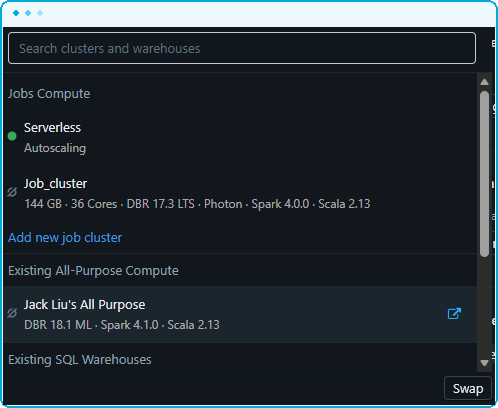
Serverless compute is another strong option for teams that want to eliminate cluster management overhead. This is because it is a fully managed, auto-scaling execution environment where Databricks provisions, configures, and terminates the underlying infrastructure automatically. Due to its auto-scaling nature, it works well for highly variable workloads and SQL-heavy analytics. However, it’s important to evaluate total DBU and infrastructure cost together and consider workload predictability before adopting it widely.
The principle is simple:
Match the compute model to the workload pattern, not the other way around.
Compute configuration: small settings, big impact
Once the right compute type is chosen, configuration becomes the next optimisation layer.
Autoscaling is often misconfigured. A common mistake is setting maximum workers excessively high “just in case.” In reality, most workloads never use that upper bound consistently. Instead, profile the job, monitor actual usage, and define realistic minimum and maximum worker limits based on data and not assumptions.
Minimum workers also matter. Setting them too high prevents effective downscaling and maintains a consistent baseline cost, even during low activity. Let autoscaling handle bursts while keeping capacity aligned with workload requirements. Autoscaling can be enabled by ticking the box under compute configuration from the job settings.
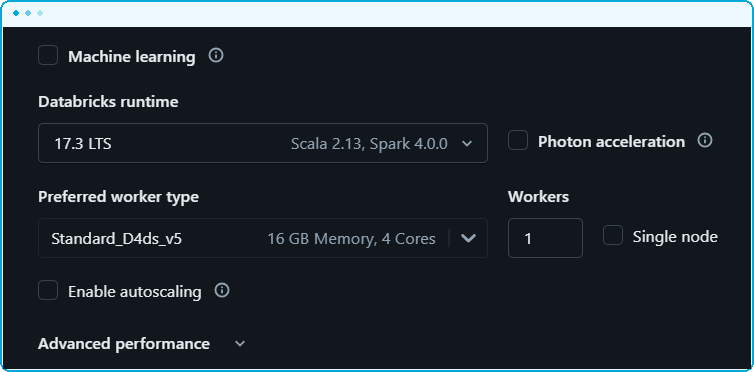
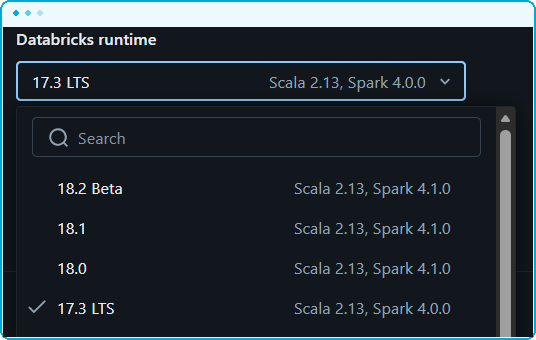
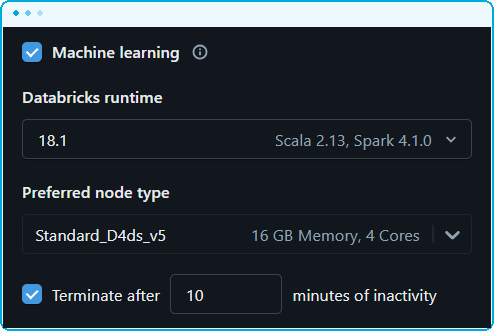
Databricks Runtime selection can also influence cost. Newer runtimes frequently include performance improvements and query optimisations. Faster execution reduces total runtime, which directly reduces DBU consumption. Ensure you are using an LTS (long-term support) version by editing the selected runtime in the compute settings. This is recommended in all instances, unless there is a specific need to use an older runtime, such as if you are using third-party packages that may rely on a specific Python version not matching the current runtime.
If you are running all-purpose clusters, auto-termination should be a non-negotiable. Setting up an idle timeout prevents clusters from running overnight when they are no longer needed, helping to improve compute cost efficiency. This can be enabled by ticking the “Terminate after” option and selecting a time in the Personal Compute edit page under the Performance section. Note, the minimum is 10 minutes.
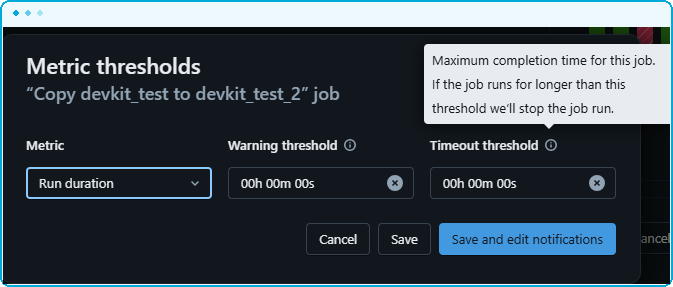
Additionally, setting a job timeout threshold can also help terminate jobs that run for longer than expected. This ensures long-running or stuck jobs are automatically terminated, helping manage compute costs and prompting investigation when jobs exceed their expected duration.